Overpass
For the longest time I have been running Heavenscape SkyTrack on a Windows laptop to drive my iOptron strain-wave mounts. It works, but it meant keeping a Windows machine alive for one job, and that machine was always the one that wanted an update on a clear night. Overpass is the native macOS and iOS replacement.
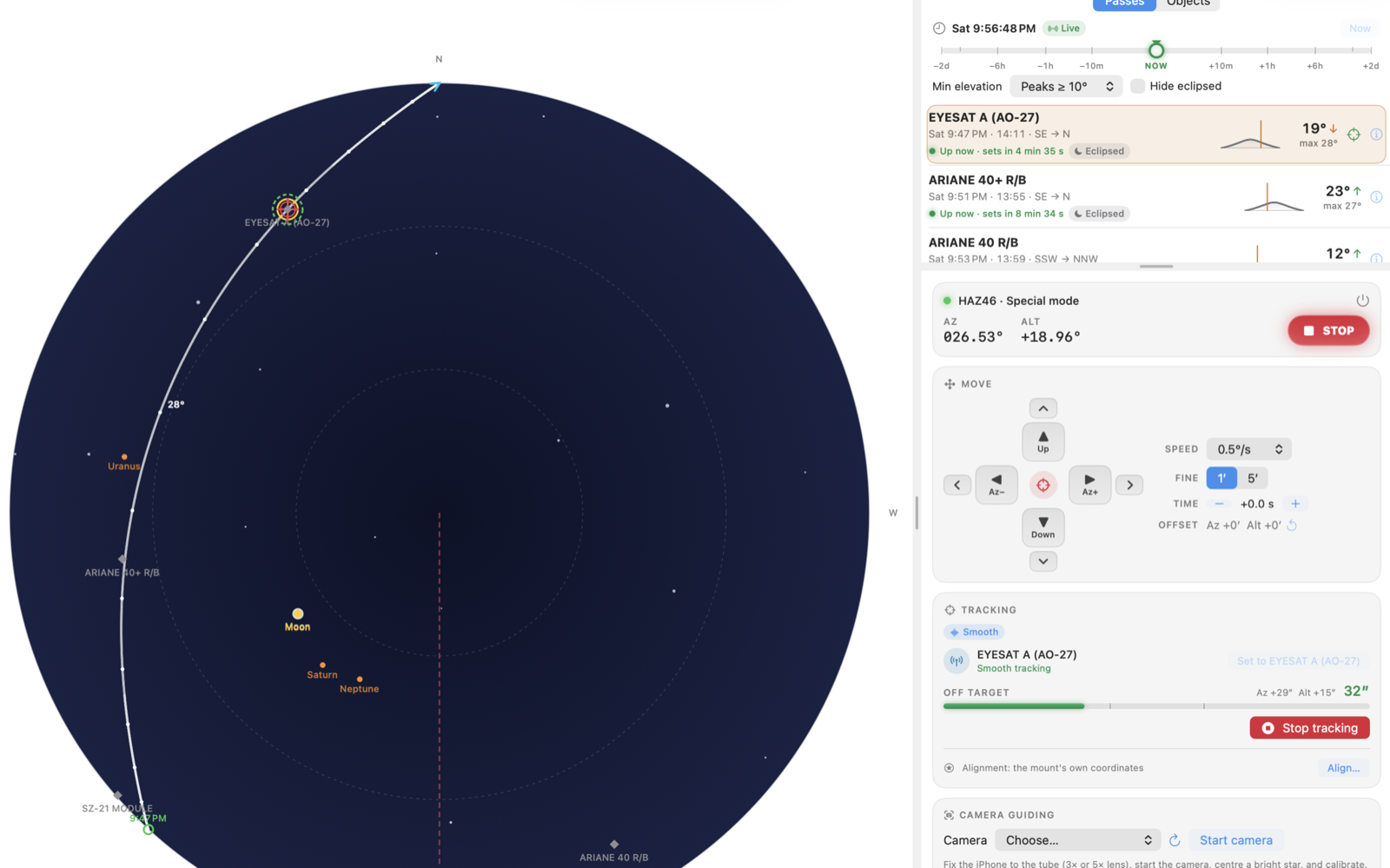
Smooth tracking EYESAT A (AO-27) on a HAZ46 over USB, 32″ off target while it caught up.
What it does
Passes
SGP4 prediction from CelesTrak groups, your own URLs or local TLE files, with the age of each source shown. Filter by peak elevation, duration, visibility, distance from the Sun and whether the mount can keep up. A time bar moves the sky up to two days either way, and the mount will follow it if you want to rehearse a pass in daylight.
Tracking
- Passive over WiFi or USB in Normal mode: one goto, then the mount's own sidereal, lunar or solar rate, for stars, planets, the Moon, the Sun and geostationary satellites. It isn't offered for any other satellite.
- Step over WiFi or USB in Normal mode: a goto to where the target will be, every couple of seconds. Fine for an antenna and jumpy in a telescope.
- Smooth over USB in Special Mode: both axis rates varied about seven times a second against a planned track, settling to a median error of about 2″.
Cable stop
The mount never turns through north, in either hemisphere. The HAZ46's own goto works this way, and every slew and pass is planned to match, going the long way round when it has to. When a pass reaches north the mount stops and Overpass asks whether to unwind and carry on, or does it without asking if you set that. Over USB there is an option to track up to 90° past north, with the mount unwinding when tracking ends, as long as your cables have the slack. Over-the-top flips are there for passes close to the zenith.
Sky, globe and map
The Observe screen switches between the sky overhead, a 3D globe and a flat world map centred on you. Up to five passes show at once, each in its own colour: click, ⌘-click and ⇧-click in the pass list on a Mac, or Select, swipe and long-press on an iPhone or iPad. The globe has each ground track, the satellite at its real height, and the footprint of the pass in focus, with day and night following the Sun. The globe and map are drawn from NASA's Blue Marble and Black Marble images bundled with the app, so they work in a field with no signal.
Conjunctions
Space station transits of the Moon and Sun around any place you choose, out to two weeks, on a map with the band where the transit is visible and the time along its centreline. Watched events refresh their elements and recalculate as the day gets closer. This map uses Apple's MapKit on purpose: the band is a few kilometres wide and lasts under a second at any spot, so picking a road inside it takes street-level detail, and that needs a network connection while you plan.
Status
The tracking target in numbers, every second: range, range rate, speed, height, speed across the sky, magnitude and the Maidenhead square below it. Countdowns to rise, peak, set and shadow entry and exit to a tenth of a second. Active transmitters from the SatNOGS DB with Doppler-corrected receive and transmit frequencies. Exposure, frame rate and size in pixels for your focal length and pixel size, the pass's peak axis speeds against the mount's, and what the mount reports about itself when it connects, including its clock and firmware.
Catalogues and comets
Messier, Caldwell, NGC and IC by the hand controller's numbers, every IAU-named star to magnitude 4, and comets from the Minor Planet Center, refreshed daily. Passive tracking sends the mount to the object's RA and Dec for tonight and lets it track, the same as a hand controller goto, and re-centres comets as they move. Search for NGC 891 or M13 to go straight there.
Also included
A pass calculator out to fourteen days for any object, star alignment, camera guiding with an iPhone through Continuity Camera, and a red night-vision mode that covers the globe and map as well. WWV-style ticks count down the last ten seconds before a pass starts, with a tone a minute out. The mount panel shows the mount's GPS status, and once the fix has held for half a minute it offers the mount's position as your location. On an iPhone, Look up overlays the sky, the planets and the pass on the camera as you hold the phone up. Settings export to a file for moving between a Mac and a phone.
Connecting
WiFi uses iOptron's normal command set on the mount's own network. USB does the same in Normal mode, or switches to Special Mode for Smooth tracking, which only works over USB; on a Mac the HAZ46 cable appears as /dev/cu.PL2303G-USBtoUART210. Overpass always starts in Normal mode. An iPad with an M1 or later chip uses the same cable through Overpass's own driver, switched on in Settings › Overpass › Drivers. An iPhone connects over WiFi only.
What I found out about the HAZ46
iOptron's Special Mode documentation stops short of a few things that matter, so this is what the mount actually does.
- P0 reads azimuth minus 180°, so its zero faces south, and P1 reads the zenith distance, so it counts down as the tube rises. I found this out when a satellite approaching the horizon had the tube pointing straight up.
- After the mount has been in Special Mode,
:GAC#in Normal mode reads az 0°, alt 0° until the mount is aligned again. - After
:ZZZ#the mount says nothing for about a second while it changes modes, and anything asked in that second times out. - Every 5 seconds it answers a position request about 15 ms late, which at satellite speeds looks like a 10 to 20″ tracking error if you trust the timestamp of the reply.
- The Normal-mode goto never turns through north. I measured it with 90° hops for three turns each way, and again with the mount set to 35° S: every hop across north went the long way round, and every hop across south went the short way. It unwound after as little as 180° of turn, so there is no wind-up allowance to use. The Special Mode slew,
:T0#, treats north as two separate ends as well. - A goto at full speed (
:MSR9#) covers 90° in about 17 s and 270° in about 47 s, and lands within 0.005°. Asking the mount anything while it slews makes it hesitate, so Overpass stays quiet for the expected slew time before checking whether it has arrived. - Leaving Special Mode,
:GAC#reports a placeholder (az 0°, alt 0°, or az 180°, alt 90°) for several seconds before the real position comes back. A sync sent in that window is added to the position the mount kept, which is how I once doubled it. - The
:GLS#status reply also carries the mount's latitude, longitude and GPS state (0 no GPS, 1 no fix yet, 2 fix), which is where Settings gets the mount's GPS position from.
The full list, with the measurements behind each one, is in docs/iOptron-Special-Mode-Protocol.md.
Accuracy
Satellite positions come from SGP4 through SatelliteKit, with one correction. SatelliteKit 2.1.2 reads the exponent of the TLE drag term as a character code, so every satellite had its drag set to about 10−52 and low orbits ran late by roughly 0.6 s a day after epoch and 200 s after two weeks. That explained a few things. Overpass now reads the TLE columns itself. The bug is reported upstream as SatelliteKit #16, with a one-line fix in #17.
| Checked against | What | Agreement |
|---|---|---|
| Reference SGP4 (Vallado, as used by Skyfield) | Vanguard 1, and the ISS a week after epoch | within 10 m |
| transit-finder.com, same TLEs | 14 ISS and Tiangong transits of the Moon and Sun around Griffith Observatory over two weeks | 0.13 s · 0.5 km · 4% width |
| Meeus, Astronomical Algorithms | Sun, Moon and planet positions | worked examples |
None of this makes a TLE more accurate than it is. ISS reboosts move events by seconds, which is why watched conjunctions refresh their elements.
Status
Tested on a HAZ46
The WiFi connection, Passive tracking of the Moon, Step tracking from a Mac and from an iPhone, USB Special Mode, Smooth tracking at about 2″, the north stop in both hemispheres and reading the mount's GPS position.
Not yet tested on hardware
The iPad USB driver, camera guiding, the stop and unwind at north during a real pass, tracking past north over USB, the GPS status with a mount that has a fix, and the fix for the 5 second timing glitch, which I ran out of battery before trying.
Reporting a problem
Issues are turned off on the GitHub repository, so problems and questions come to me by email at AB6A@arrl.net. Most mount trouble happens in the dark in a field, and I can only fix what I can replay, so the log matters more than the description. Send:
- The mount log. Settings, Reporting a problem, Share the mount log. Every connect, mode switch, goto, step and stop is in it with a UTC time and what the mount read back. On a Mac it is also at
~/Library/Containers/com.djsincla.overpass/Data/Library/Application Support/com.djsincla.overpass/mount-log.txt. - Your settings file. Settings, Settings file, Export. Be aware it includes your latitude and longitude, so edit those out if you would rather not say where you observe from.
- When and what. The time it went wrong, in UTC if you can, the pass or object, and the tracking mode.
- The mount. Its model and the MountInfo code the mount panel shows when connected, the firmware version if you know it, and whether it was on WiFi, USB Normal mode or USB Special Mode.
- A trace, for tracking errors. Turn on Settings, Keep a tracking log to export, track the pass again, then Export from the trace panel. It is off by default because it holds minutes of samples in memory.
- A photo or a short video if the mount did something physical, such as heading off the wrong way round.
If you have a mount I have not tested, such as an HAE, run Test the mount's slew and Test mode switching in Settings first. Both write what they find to the mount log, and that log is what I need to add support for it.
Building
The Xcode project is generated from project.yml, and the tests run with Swift Package Manager.
git clone https://github.com/djsincla/Overpass.git
cd Overpass
xcodegen
open Overpass.xcodeproj
swift test
You will need your own signing team in project.yml. Read the cable stop settings before you trust the app with your cabling; a mount that slews into its own tripod is still your problem.