AB6A RigCtl
rigctld, without the terminal
A macOS menu bar app that finds your radios and runs a Hamlib daemon for each one.
Requires Hamlib — brew install hamlib
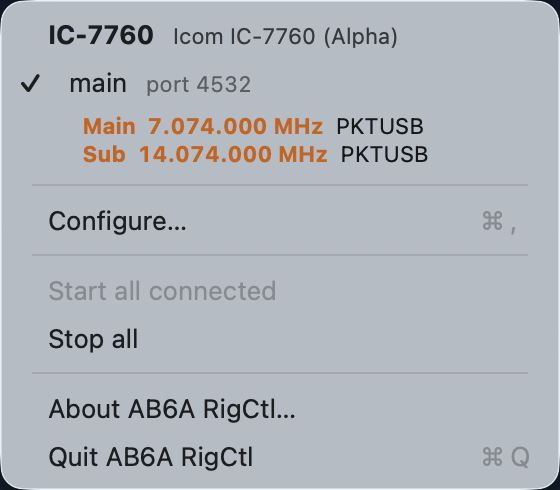
One daemon, both receivers — live from the rig.
rigctld, without the terminal
A macOS menu bar app that finds your radios and runs a Hamlib daemon for each one.
Requires Hamlib — brew install hamlib
One daemon, both receivers — live from the rig.
Reads the USB descriptor over IOKit, so a radio identifies itself. An IC-7760 is recognised as Hamlib model 3092 without being told.
Profiles are keyed on the USB serial number and interface number, not the
/dev path. Move the radio to another port and it is still recognised.
A radio with several interfaces runs several daemons, each on its own TCP port — one for WSJT-X, another for logging.
Reads frequency and mode straight from the running daemon through libhamlib's NETRIGCTL backend.
Hamlib keeps the three apart: separate daemons, separate model tables, separate default
ports, separate protocols. Handing a rotator model number to rigctld just
gets you Unknown rig num. Each device carries a type, and everything else follows from it.
| Type | Daemon | Default port | Models | The menu shows |
|---|---|---|---|---|
| Radio | rigctld | 4532 | 312 | frequency and mode |
| Rotator | rotctld | 4533 | 57 | azimuth and elevation |
| Amplifier | ampctld | 4531 | 5 | SWR |
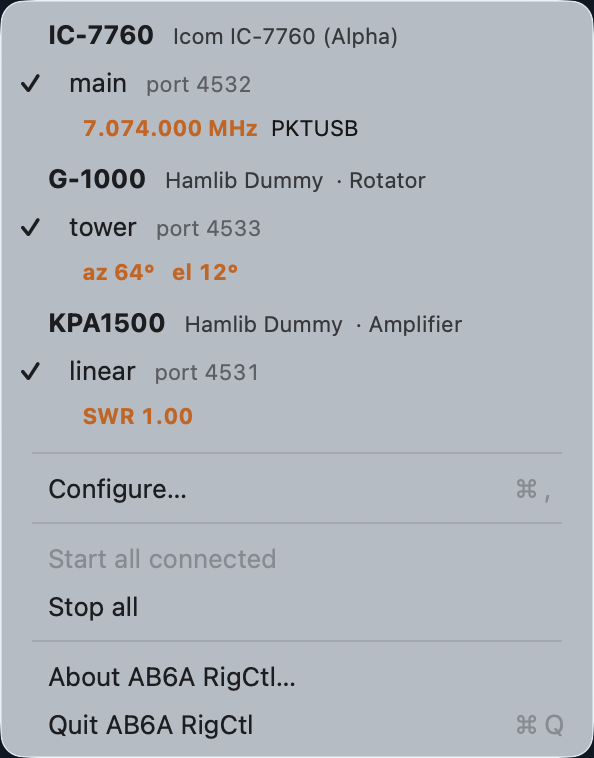
Ports are assigned from each type's Hamlib default and step over the others', so adding a second radio never claims the port a rotator will want.
The rotator and amplifier here are Hamlib's dummy backends, shown next to a real IC-7760 — which is also how the support was developed and tested. The rotator is mid-slew, which is why its azimuth has not reached the commanded heading yet.
An IC-7760 presents two serial ports over one USB cable, and they appear as interface 1 and interface 3 — not 1 and 2. That is not a gap; it is what the USB descriptor actually says:
interface 0   class 2    Communications (CDC control)   ┐ serial port one
interface 1   class 10   CDC-Data  →  /dev/cu.usbmodem114101   ┘
interface 2   class 2    Communications (CDC control)   ┐ serial port two
interface 3   class 10   CDC-Data  →  /dev/cu.usbmodem114103   ┘
Every CDC-ACM serial port costs two
USB interfaces — one for control, one for data — and only the data half gets a
/dev node. Interface 2 is alive and well: it is the control channel for the
second port, and simply carries no tty. AB6A RigCtl shows the number the descriptor
reports rather than renumbering them, so what you see here matches what
ioreg and Hamlib see.
The 7760 answers CI-V on both interfaces, so each can carry its own daemon on its own port — one for digital modes, one for logging. You do not need two just to see both receivers: a single daemon set to A and B reports the whole radio, as in the screenshot at the top. In Configure… it looks like this:
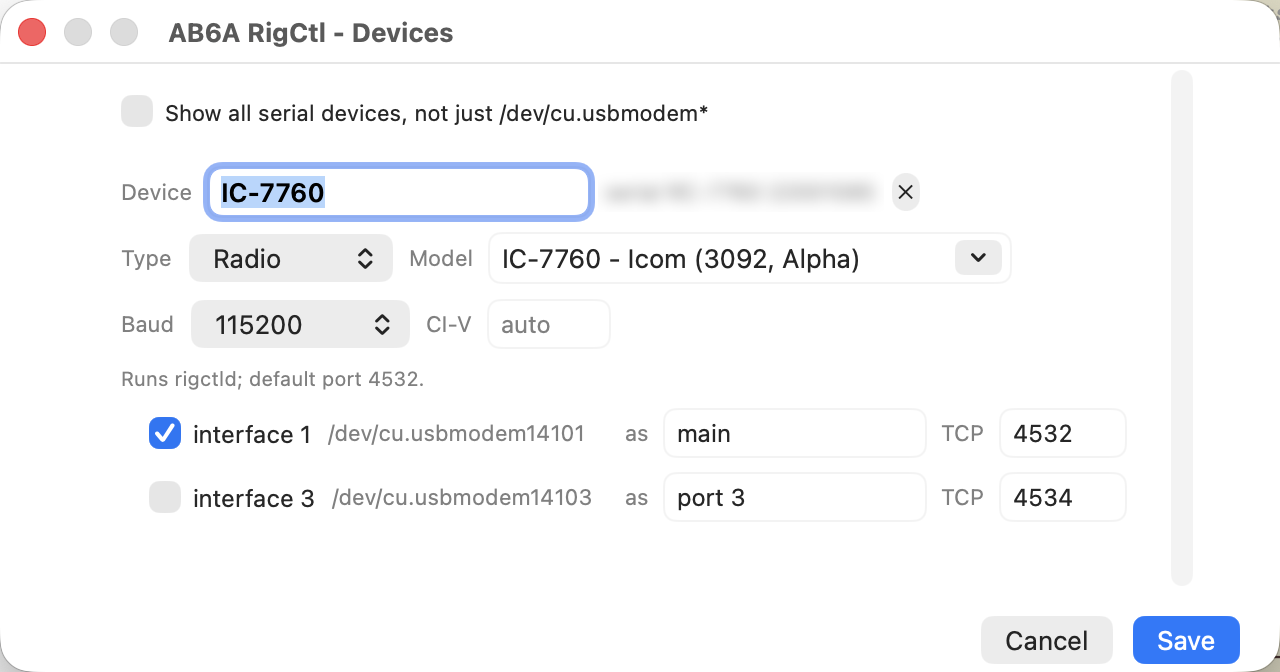
Point WSJT-X at localhost:4532 and your logger at
localhost:4534, both as
Hamlib NET rigctl. The second daemon is
offered 4534 rather than 4533, because 4533 is rotctld's default and is
held for a rotator. The radio is
identified from its own USB descriptor, so model 3092 is filled in for you — Hamlib
never probes the rig.
A dual-receive radio reports two VFOs, shown as A and B. These do correspond to the radio's own VFO A and B — verified by moving one from the computer and watching which changed on the front panel, and again by transmitting split and seeing B key up.
What is not dependable is Hamlib's internal naming. It calls them Main and Sub, but its
“Main” tracks whichever VFO is selected rather than the Main receiver: a
set_vfo Sub that the radio ignored outright still made Hamlib report the two
swapped. Asking for VFOA/VFOB changes nothing — this backend
aliases them to Main and Sub and they move together, and
Can get VFO: N means Hamlib cannot read the VFO back to correct itself.
The practical consequence: under split transmit Hamlib's reporting inverts, the frequencies trading places on key-down and back on release. The display holds its last reading taken at rest and shows TX while it does, so what you see stays correct through a transmission.
Exactly one daemon owns each serial interface. Two daemons on one interface
appear to work, which is the danger: measured on an IC-7760 at 60 concurrent
reads each, about 3% of transactions came back as RPRT -9 / RPRT -20
protocol errors and the rest looked fine — and that was read-only traffic. Across two
different interfaces the same test was clean. Silent, intermittent corruption is worse
than an outright failure, so this is enforced rather than warned about.
AB6A RigCtl does not bundle Hamlib and will not work without it. Hamlib provides
rigctld — the daemon this app starts, supervises and reads from — along with
the rig model table it uses to identify your radio. Install it first:
brew install hamlib
| What | Why it is needed |
|---|---|
rigctld |
The daemon itself. One is launched per radio interface; it owns the serial port and serves the rigctl protocol on a TCP port. |
rigctl -l |
The rig model table. Read once to populate the model picker and to turn a radio's USB product name into a Hamlib model number. |
libhamlib |
Not used. The app links no Hamlib library — it speaks the rigctl network protocol over a plain socket, so it has no third-party dynamic dependencies. |
Developed and tested against Hamlib 4.7.2.
Anything recent enough to ship rigctld and the
NET rigctl backend should work, since the app depends on the protocol
rather than on a library ABI. Note that backend maturity varies by radio — an IC-7760
is Alpha in Hamlib 4.7.2, which
the model picker shows you.
Download for Apple Silicon macOS 26+ · signed & notarized
# Hamlib provides rigctld - required either way
brew install hamlib

# or build it yourself
git clone https://github.com/djsincla/ab6a-rigctl
cd ab6a-rigctl && ./build-app.sh --install
The download is signed with a Developer ID and notarized by Apple, with the ticket stapled — it opens normally, with no right-click or quarantine step.
Installs /Applications/AB6A RigCtl.app and puts ab6a-rigctl
on your PATH. The app lives in the menu bar
with no Dock icon. Both share one ~/.config/ab6a-rigctl/profiles.json,
so they cannot disagree about your radios.
| Command | Does |
|---|---|
ab6a-rigctl | interactive manager — add radios, pick interfaces and ports |
ab6a-rigctl devices | list attached radios |
ab6a-rigctl list | saved radios and whether they are running |
ab6a-rigctl start [name|all] | a radio name starts every daemon on it |
ab6a-rigctl stop [name|all] | stop daemons |
WSJT-X, fldigi and logging software connect to localhost:4532
and speak the rigctld network protocol — the daemon is the product, not an implementation
detail. An app that drove the radio in-process through libhamlib would hold the serial
interface open and give those programs nothing to connect to, while becoming a second
owner of a line that already has one.
So the app links no Hamlib library at all. It runs rigctld and speaks the rigctl protocol to it over a plain socket. That leaves it with no third-party dynamic dependencies, which is also why it signs and notarizes without a library-validation exemption.